
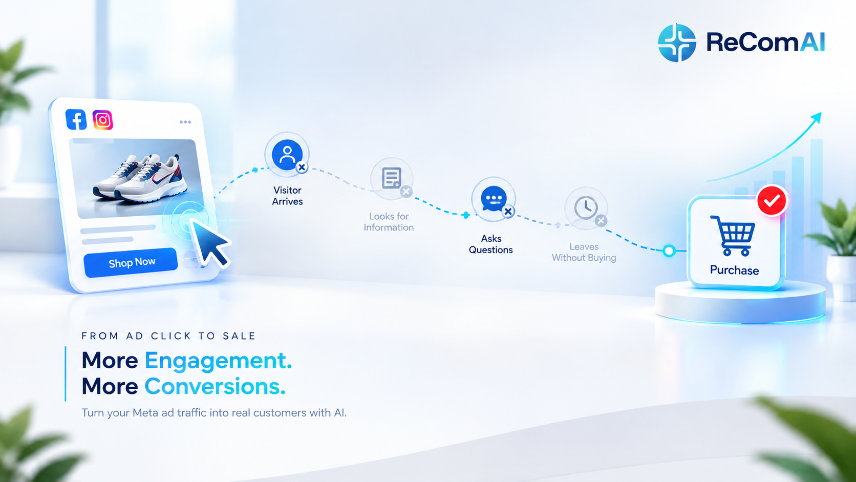
Most eCommerce brands can tell you their CPC, their CTR, and their ROAS down to the decimal. Far fewer can tell you what actually happens in the three seconds after someone clicks their Meta ad. That gap — between what the ad account measures and what actually determines whether a click becomes a sale — is where a large share of "underperforming" ad spend quietly disappears.
Why Meta Ads Are the Default Starting Point for eCommerce Brands
Meta ads aren't popular because they're the cheapest channel or the easiest to run — they're popular because they solve a specific problem almost every eCommerce brand starts with: nobody knows the product exists yet.
Search ads capture demand that already exists — someone typed a query because they already know roughly what they want. Meta ads create demand. They put a product in front of someone who wasn't actively looking for it, using targeting, creative, and placement to make a case for why they should care. That's a fundamentally different job, which is why Meta remains the default channel for brands with a new product, a new audience, or a need to scale past the people already searching for them.
TThe other reason brands stay on Meta is compounding value. Every ad served builds a retargeting pool, generates engagement signals that sharpen future targeting, and produces creative-performance data that improves the next campaign. Meta ads rarely work as a single isolated push — they work as an engine that gets more efficient the longer it runs, provided everything downstream of the click is actually built to capture what that engine produces. Part of capturing that value also means connecting the right Meta channels to your business — WhatsApp and Instagram included — so the conversation an ad starts doesn't have to end the moment someone leaves the landing page.
What Actually Happens in the Seconds After the Click
Here's where most performance analysis quietly stops. A brand looks at CPC, CTR, and ROAS, decides the campaign is "working" or "not working," and adjusts targeting or creative accordingly. But the ad's job ends the moment someone clicks. Everything that determines whether that click becomes a sale happens somewhere the ad platform doesn't report on: your site.
Three specific things happen after a click, and each one is a point where a sale can quietly fall apart:
The landing page has to match the ad's specific promise. If the creative showed a specific product, a specific offer, or a specific angle, and the click lands somewhere generic - a homepage, a broad category grid, anything that isn't the thing that made them click - a meaningful share of that traffic leaves immediately. They already got the moment of interest the ad created; if the site makes them re-find what they clicked for, most won't bother.
The page has to load fast enough to matter. Paid traffic tends to be more impatient than organic traffic — they didn't seek you out, an ad interrupted their scroll, and their tolerance for a slow page is lower as a result. A few extra seconds of mobile load time is enough to lose clicks you already paid for.
The page has to remove doubt, not create it. A shopper who clicked a cold ad for the first time has no existing trust in the brand. If the product page doesn't proactively answer the obvious questions — is this legitimate, will it fit, what happens if I don't like it — that hesitation shows up downstream as an add-to-cart that never happens.
Why This Gap Stays Invisible Inside the Ad Account
Ad platforms report what happens inside the platform extremely well — impressions, clicks, cost, even on-platform conversion events. What they can't tell you is why a shopper who was clearly interested enough to click didn't convert once they landed. That blind spot gets misread constantly as a targeting or creative problem, because targeting and creative are the only levers the ad account actually gives you to pull.
This pattern shows up repeatedly across paid-and-site audits: campaigns with genuinely strong click-through rates and healthy CPCs still producing weak ROAS — not because the ads were wrong, but because everything downstream of the click was quietly working against them. A generic landing page. A confusing size chart. A checkout step asking for more than it needed to. A tracking pixel that wasn't firing correctly at all. None of that shows up in Ads Manager. All of it shows up in ROAS.
Signs Your Post-Click Experience Is Quietly Costing You
A few patterns tend to repeat across brands spending well on Meta but converting poorly on-site:
- Every ad links to the same homepage or general collection page, regardless of which specific product or offer the creative featured
- Mobile load time is noticeably slower than desktop, even though most Meta traffic arrives on mobile
- Product pages are missing basic trust signals — no clear return policy, no sizing or fit guidance, no proof beyond the product photos
- Checkout asks for more than it needs to, particularly forced account creation before a first purchase
- CTR and engagement look healthy, but reported ROAS doesn't match how the account "feels" — often a sign the tracking setup, not the ads, is the actual problem
- High retargeting frequency with no corresponding lift, suggesting the same audience is being shown the same message without the site giving them a new reason to convert
Any one of these can quietly cap performance no matter how much the ad side improves.
Mistakes That Quietly Waste Ad Spend After the Click
Mistake 1: Sending Every Ad to the Same Generic Page If the creative promotes a specific product or drop, and the click lands on a homepage or unrelated collection, you're forcing an already-interested shopper to re-do the work the ad should have finished. Fix: link every ad directly to the specific product or landing page it promotes, not a generic entry point.
Mistake 2: Ignoring Mobile Load Time Most Meta traffic is mobile, and mobile shoppers have a lower tolerance for slow pages than desktop or organic visitors. Fix: test load time from a cold mobile connection, not just a desktop preview — a page that "feels fine" on office wifi can be unacceptably slow on the connection most shoppers are actually using.
Mistake 3: Leaving Trust Signals Off the Product Page A first-time visitor from a cold ad has no existing trust in your brand. Fix: put return policy, sizing/fit information, and proof (reviews, certifications, material details) directly on the product page — not buried in a separate tab or FAQ link.
Mistake 4: Adding Friction to Checkout Every unnecessary field or forced account-creation step is a point where paid traffic — traffic you already spent money to acquire — can quietly drop off. Fix: offer guest checkout by default and remove any field that isn't strictly required to complete the order.
Mistake 5: Trusting ROAS Without Verifying Tracking A pixel that stopped firing correctly after a theme update, or that under-reports on certain browsers, will make genuinely good ad performance look like a failing campaign — and lead to cutting spend that was actually working. Fix: cross-check platform-reported revenue against your actual order data at least monthly, and set up server-side tracking as a backup layer.
Mistake 6: Treating Ad Fatigue and Site Fatigue as the Same Problem Rising frequency with dropping CTR usually means creative fatigue. Rising frequency with stable CTR but declining conversion usually means the site, not the ad, has stopped converting the same audience effectively. Fix: separate these two diagnoses before deciding whether to refresh creative or fix the landing experience.
The Post-Click Audit: Step by Step
This doesn't require a full teardown — it requires actually following your own ad the way a real shopper would.
Step 1: Click your own ads from a cold account, on mobile, on a normal connection. Not through the ad preview tool — an actual click, the way a real prospect would experience it. Time how long the page takes to feel usable.
Step 2: Check whether the landing page matches the ad's specific promise. If the creative features a specific product or offer, that's exactly where the click should land — not a step removed from it.
Step 3: Look for the questions a first-time buyer would have, and check if the page answers them without being asked. Sizing, materials, return policy, delivery time — if any of these require digging, that's friction a warmer, more trusting visitor wouldn't have tolerated either.
Step 4: Verify your tracking is actually accurate before trusting the ROAS number. Compare platform-reported purchases against your actual order count for the same period. A meaningful gap points to a tracking issue, not a targeting one.
Step 5: Test the checkout path itself, start to finish. Every extra step, every unnecessary field, every forced account creation is a point where already-paid-for traffic can quietly drop off.
Step 6: Repeat this monthly, not once. Theme updates, new apps, and site changes can silently break tracking or slow load times well after your original audit — a pattern worth checking on a recurring basis, not just at launch.
What Good Alignment Between Ads and Site Looks Like
Realistic benchmarks for brands where the ad and the post-click experience are actually working as one system:
| Metric | Weak Alignment | Good Alignment |
|---|---|---|
| Mobile landing page load time | 4+ seconds | Under 2.5 seconds |
| Bounce rate from paid traffic | 65%+ | Under 45% |
| Checkout completion rate (paid traffic) | Under 20% | 30%+ |
| Gap between reported and actual revenue | 10%+ discrepancy | Under 3% discrepancy |
| ROAS lift after fixing landing page match | — | 2–4x typical |
If your numbers sit closer to the "weak alignment" column, the fix is rarely a bigger ad budget — it's closing the specific gap the audit above surfaces.
Frequently Asked Questions
The Takeaway
Meta ads are built to do one job extremely well: get attention and generate a click from someone who wasn't already looking for you. What happens in the seconds after that click is a completely different system — page speed, landing page relevance, trust signals, checkout friction, and tracking accuracy — and it's almost entirely invisible from inside the ad account itself.
The brands getting the most out of their ad spend aren't necessarily running better ads. They're the ones treating the ad and the site as one connected system, auditing both together instead of optimizing one while the other quietly undoes the work.
Next Steps
If you're running Meta ads and aren't sure whether the gap is in your targeting or in what happens after the click, the fastest way to find out is to actually follow your own ad through to checkout, on mobile, like a real customer would. If something feels slow, confusing, or off-brand at any point in that path, that's very likely where budget is quietly leaking — not in the ad account.
Keywords