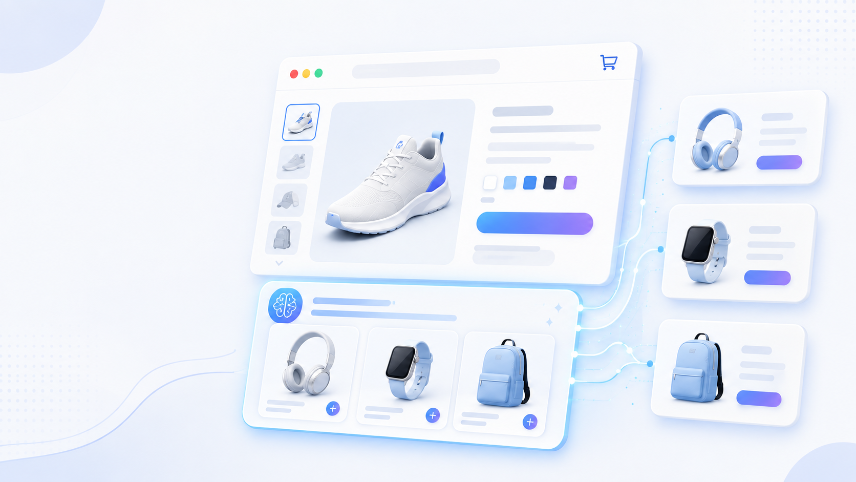
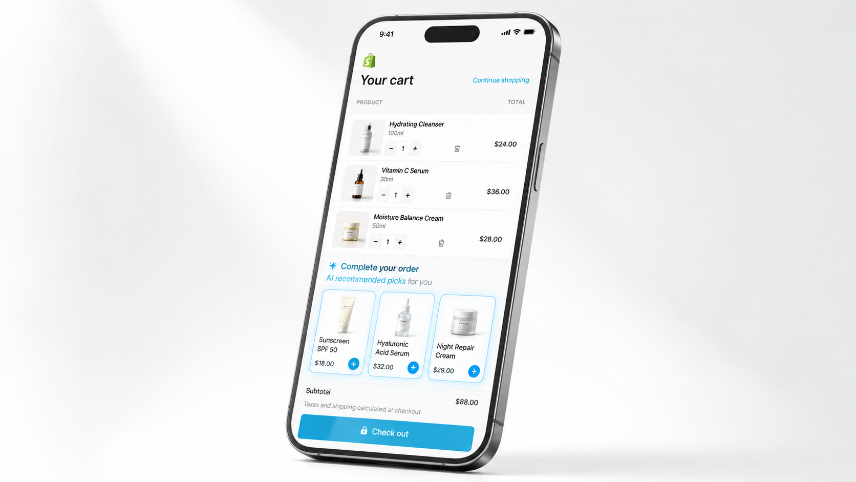
Most Shopify stores focus all their recommendation effort on the product page and forget about the cart. That's a significant missed opportunity. The cart page is the second-highest intent moment in the entire shopping journey — the shopper has already decided to buy. Adding AI cross-sell recommendations here doesn't interrupt the purchase; it enhances it.
Here's exactly how to set it up, what to show, and the mistakes that quietly suppress performance.
Cart cross-sells should not work in isolation: the shopper's first recommendation often appears on the product page, before they reach the cart. Start with our AI product recommendations on Shopify setup guide, then use this cart-page layer to continue the recommendation journey after the primary product is chosen.
Why the Cart Page Is the Right Place for Cross-Sells
Cross-selling on the product page works. But cross-selling on the cart page works differently — and often better — for one simple reason: commitment.
When a shopper reaches your cart, they've made a decision. They're not browsing anymore. They're preparing to spend money. That psychological shift changes how they respond to additional product suggestions.
On the product page, a recommendation competes with the shopper's attention on the main product. On the cart page, the main product is already decided. The shopper's mental bandwidth is now free to consider what else they might need.
This is why cart-page cross-sells consistently outperform product-page cross-sells on a per-impression basis — even when the recommendations themselves are identical.
The data bears this out. Stores that add AI cross-sell recommendations to their cart page typically see:
- 15–28% lift in AOV from cart page recommendations alone
- 6–12% increase in items per order
- No meaningful increase in cart abandonment (a common concern that rarely proves true in practice)
The Difference Between Cross-Sell and Upsell on the Cart Page
Before setup, it's worth being precise about what you're deploying:
Cross-sell: A complementary product that adds value alongside what's already in the cart. If the shopper has a camera in their cart, a memory card is a cross-sell.
Upsell: A higher-value version of what's already in the cart. If they have a 64GB memory card, a 256GB version is an upsell.
Cart pages can support both, but they work differently:
| Type | Best placement | Typical label | AOV impact |
|---|---|---|---|
| Cross-sell | Below cart items | "You'll also need" / "Complete your order" | Medium-high |
| Upsell | Inline, next to the item | "Upgrade to" | High but lower click rate |
For most stores, cross-sells on the cart page outperform upsells simply because they're less friction — adding a product is easier than replacing one.
This guide focuses on cross-sells. If you want upsells, the placement and logic are different, and that's a separate setup.
What AI Does That Manual Cross-Sells Can't
The traditional approach to cart cross-sells is rule-based: if cart contains Product A, show Product B. That works when you have a small catalogue and clear product relationships. It breaks down at scale.
An AI cross-sell engine does something different. Instead of following rules you've written, it learns from actual purchase behaviour:
Session-level signals: What has the shopper viewed in this session? What search terms brought them here? How long did they spend on the product page? These signals shift the recommendations in real time, without any manual input.
Cart composition analysis: If the cart contains three skincare products, the AI recognises the pattern and recommends a fourth that frequently appears in similar carts — not just a generic "you might like."
Price sensitivity matching: If the cart total is £45 and your store's average add-on item is £12–£18, the AI weights its recommendations toward items in that range. A £95 add-on recommendation into a £45 cart rarely converts; the AI knows this.
Purchase history (for returning customers): If the shopper has bought from you before, the AI excludes products they already own and weights recommendations toward items that complement their purchase history.
Manual rules can approximate some of this. They can't do all of it simultaneously, in real time, for every shopper.
Cart Page Recommendation Placement: Three Options That Work
Where you place cross-sell recommendations on your cart page matters as much as what you show. Here are the three placements that consistently perform, in order of typical conversion impact:
Placement 1: Below the Cart Line Items, Above the Checkout Button
This is the highest-converting position for cart cross-sells. The shopper has reviewed their cart and is about to click checkout. One last look at "Complete your order" recommendations catches them at peak buying intent.
What works here:
- 2–4 products maximum (more than 4 and conversion drops)
- Compact horizontal layout on desktop, vertical stack on mobile
- One-click add-to-cart (no product page redirect)
- Price shown clearly next to each recommendation
What to label it: "Complete your order" and "You'll also need" outperform "You might like" in most cart-page A/B tests. The first two phrases are specific — they imply the recommendations are functional additions to what's already in the cart. "You might like" is generic and reads as advertising.
Placement 2: Inline, Next to Each Cart Item (Mini Cross-Sell)
This is a more advanced placement. Instead of one recommendation block for the whole cart, each line item in the cart has a small "add-on" suggestion directly beside it.
This works particularly well for stores where each product in the cart has a clear, specific complementary item — accessories, consumables, replacement parts, protection plans.
Example:
- Cart item:Ceramic Hair Straightener — £89
- Inline suggestion:Heat Protection Spray — £14 [+ Add]
The inline approach adds visual complexity to your cart, so test it carefully before rolling it out. For stores with simpler catalogues, the block placement above performs better.
Placement 3: A Slide-In Drawer or Toast Notification
When a shopper adds something to their cart, a slide-in notification appears showing one complementary product with a one-click add option. This catches the shopper at the exact moment of the add-to-cart action — high intent, low friction.
This placement works well for stores using a drawer cart (the cart that slides in from the side rather than redirecting to a cart page). If your Shopify theme uses a drawer cart, this is the placement to prioritise.
ReComAI Setup for Cart Page Cross-Sells: Step by Step
Step 1: Access the Cart Recommendations Panel
In your ReComAI dashboard, go to Cart Page → Cross-Sell Recommendations. If you don't see this panel, check that you're on Forge Solo plan or above — cart recommendations aren't included in the free tier.
Step 2: Choose Your Placement
Select from the three placement options:
- Block (below cart items) — Recommended starting point for most stores
- Inline (next to each item) — Best for accessory-heavy catalogues
- Slide-in drawer — Best for themes using a drawer cart
Start with one placement. Running all three simultaneously can work, but it makes it harder to understand what's driving performance.
Step 3: Configure the Recommendation Logic
Under Recommendation Logic, set the following:
Primary signal: Purchase co-occurrence (what do customers most often buy together in the same order?)
Secondary signal: Category complement (if no purchase data exists for a product, fall back to category-level matching)
Exclusion rules:
- Exclude products already in cart
- Exclude out-of-stock products
- Exclude products the customer has purchased before (for logged-in customers)
Price range filter: Set a maximum add-on price as a percentage of the cart total. A common starting point: don't recommend products that cost more than 40% of the current cart total. A £200 recommendation into a £50 cart almost never converts.
Step 4: Set the Display Rules
Number of products to show: 2–4. Start with 3.
Display threshold: Only show the cross-sell block if the cart contains at least 1 item. (Obvious, but worth confirming it's set correctly.)
Mobile layout: Set to single column or 2-column grid. Three products side by side on mobile is too cramped.
Step 5: Customise the Labels and CTA
Change the default labels to match your brand:
Section heading: "Complete your order" or "You'll also need"
Add button: "+ Add to cart" (short, clear, one action)
Price display: Show price clearly next to each recommendation. Don't hide it.
Step 6: Set Up One-Click Add-to-Cart
This is the feature that separates high-performing cart cross-sells from low-performing ones. If clicking a recommendation redirects the shopper to the product page, most of them won't come back to the cart.
One-click add means the product goes directly into the cart without leaving the cart page. In ReComAI, enable this under Cart Recommendations → Add-to-Cart Behaviour → In-Cart Add.
Step 7: Connect Your Analytics
In Settings → Analytics Integration, connect your Google Analytics 4 or Shopify Analytics account. ReComAI tracks:
- Impressions (how often recommendations are shown)
- Clicks (how often a recommendation is tapped)
- Add-to-cart events from recommendations
- Revenue attributed to cart cross-sells
You need this data to optimise. Without it, you're guessing.
The Cold-Start Problem on Cart Pages
Cart cross-sells have a different cold-start challenge than product page recommendations. On the product page, cold-start is about individual products without enough purchase history. On the cart page, cold-start is about cart compositions — combinations of products that haven't appeared together in your order data before.
For new stores or new product launches, here's the fallback sequence to configure:
- Level 1 (enough data):AI recommendation based on purchase co-occurrence
- Level 2 (insufficient purchase data):Category-level match ("other items in this category")
- Level 3 (no data at all):Best-sellers in a complementary category, manually curated
Set all three levels in your ReComAI cold-start settings. The AI moves through them automatically as data accumulates.
Expect to be at Level 2 or 3 for the first 4–6 weeks if you're a newer store. This is normal. Don't turn off cross-sells during this period — even category-level recommendations outperform no recommendations.
The Mistakes That Kill Cart Cross-Sell Performance
Mistake 1: Showing Too Many Products
More than 4 recommendations in a cart cross-sell block consistently underperforms 2–3 recommendations. The paradox of choice effect is real: when shoppers see too many options, they pick none. Set your display limit to 3 and test from there.
Mistake 2: Redirecting to the Product Page on Click
If clicking a cross-sell recommendation takes the shopper away from the cart to the product page, you're introducing unnecessary friction. Most shoppers who leave the cart don't come back. One-click add-to-cart is non-negotiable for cart page cross-sells.
Mistake 3: Recommending Products That Are Already in the Cart
This sounds obvious but it happens — especially with AI systems that aren't configured correctly. Always enable the "exclude items already in cart" rule. Recommending a product the shopper already has builds zero trust and looks broken.
Mistake 4: Ignoring the Mobile Experience
Over 60% of Shopify traffic is mobile. If your cart cross-sell block looks fine on desktop but pushes the checkout button below a long scroll on mobile, you'll see cart abandonment increase. Test your cart page on mobile before going live with cross-sell recommendations and keep the recommendation block compact.
Mistake 5: Never Auditing What's Being Recommended
Set a monthly reminder to check your top 10 cart compositions and see what the AI is recommending for each. You'll occasionally find combinations that are technically co-purchased but don't make intuitive sense as cross-sells — or products that are frequently recommended but almost never added. These need manual overrides.
Mistake 6: Measuring the Wrong Metric
Cart page cross-sell performance isn't best measured by click rate alone. The metric that matters is revenue per session that saw a recommendation compared to sessions that didn't. Set this up in your analytics from day one, not after 3 months when you're trying to justify the app cost.
What Good Cart Cross-Sell Performance Looks Like
Benchmarks for Shopify stores with AI cart cross-sells set up correctly:
| Metric | Baseline | Good | Excellent |
|---|---|---|---|
| Recommendation impression rate | 80%+ of sessions | — | — |
| Click-through rate | 8–12% | 12–18% | 18%+ |
| Add-to-cart rate from recommendation | 4–8% | 8–14% | 14%+ |
| AOV lift vs no recommendations | 10–18% | 18–28% | 28%+ |
| Revenue attributed to cart cross-sells | 8–15% | 15–25% | 25%+ |
If you're below the baseline after 60 days, the issue is almost always one of three things: wrong placement, redirecting to product page on click, or showing too many recommendations.
A Note on Cart Abandonment
The most common objection to cart cross-sells is: "Won't adding more products to the cart page distract shoppers and increase abandonment?"
The data says no — with one important caveat.
Cart cross-sell blocks that are compact, well-labelled, and positioned below the checkout button do not meaningfully increase cart abandonment. The shopper's path to checkout remains clear.
Cart cross-sell blocks that are large, poorly labelled, positioned above the checkout button, or require the shopper to leave the cart to learn more — those can increase abandonment.
The design and placement of the block matters as much as the recommendations themselves. Keep the cross-sell section clearly secondary to the checkout flow. The checkout button should always be the most prominent element on the cart page.
Next Steps
The single highest-impact change you can make to your Shopify cart page today: add a compact "Complete your order" cross-sell block below the cart line items, above the checkout button, with one-click add-to-cart enabled.
That one change, done correctly, accounts for the majority of AOV lift that stores see when they first add AI cart cross-sells.
If you want to see how ReComAI sets this up specifically for your store's catalogue and cart compositions, book a 30-minute walkthrough below — or message us on WhatsApp if you have a quick question before committing to a full setup session.
ReComAI is an AI-powered product recommendation and customer engagement platform built for Shopify stores. It replaces static cross-sell blocks with dynamic, session-aware recommendations that improve AOV, items per order, and repeat purchase rate without increasing cart abandonment.
Keywords