
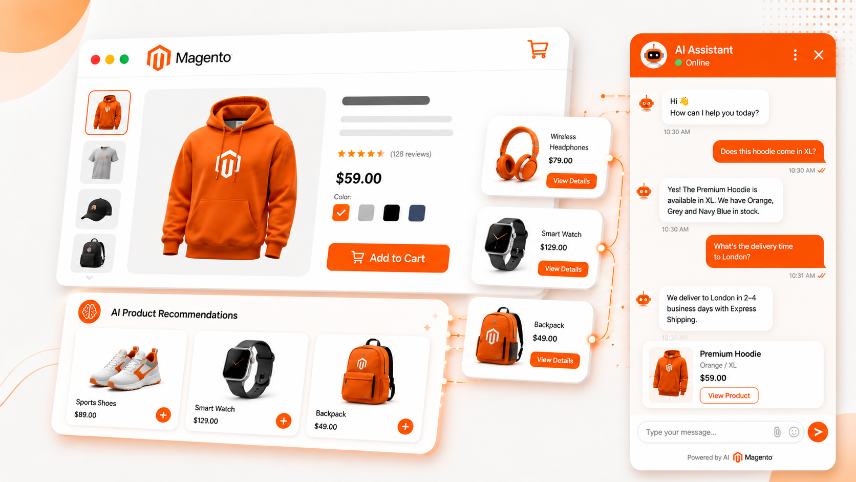
The Silent Killer of Magento Store Revenue: Missing Conversational Support
Every Magento store owner knows this moment. It's 2 AM on a Sunday. Your store has 47 visitors right now. One is staring at your product page, cursor hovering over the "Add to Cart" button. And then they close the tab.
They closed it because they had a question — "Does this fit size XL in Asian sizing?" or "Can I use this with the blue model from last season?" — and there was no one to ask.
That visitor is your lost revenue. And if you're running Magento, you're losing dozens like them every single day because your store doesn't have conversational support when they need it most.
This is where AI chatbots come in. But not the generic "Chat with us!" boxes that show up on every website. We're talking about Magento-native AI chatbots that actually know your product catalogue, your policies, and how to push visitors toward purchase — not away from the site entirely.
Conversational support works best when it is connected to the rest of the shopping experience. After the chatbot resolves a product question, an AI personalization layer can continue the journey with relevant products, category ordering, and complementary recommendations. See our guide to Magento AI personalization for the storefront setup that complements this chatbot workflow.
Why AI Chatbots Work Differently on Magento Than Other Platforms
Magento stores have something most platforms don't: deep, structured product data.
Your Magento database knows:
- Exact inventory levels and stock status by warehouse
- Complex product attributes (materials, dimensions, colors, compatibility matrices)
- Customer purchase history and repeat purchase patterns
- Custom pricing rules and promotional eligibility
- Shipping and tax logic specific to customer location
- Returns and warranty policies
A generic chatbot doesn't tap into any of this. It just has FAQ text and can offer generic help.
A Magento-native AI chatbot does. It pulls directly from your product database, sees what your customer has already viewed, knows what's in their cart, understands your inventory situation in real-time, and can answer "Is this compatible with my last purchase?" or "How fast can you ship to London?" with 100% accuracy.
The difference shows up immediately in three places:
- Fewer abandoned carts — The customer gets their question answered before they leave
- Higher average order value — The chatbot actively suggests complementary products based on what's in their cart
- Reduced support tickets — 60–70% of incoming customer service questions are answerable by an AI chatbot, which means your actual support team focuses on the problems that actually need human judgment
What an AI Chatbot Actually Does on Your Magento Store
Before you set one up, understand exactly what you're deploying.
A properly configured AI chatbot on Magento does four things simultaneously:
1. Answers Product Questions in Real-Time
Customer: "Does the cotton version of the shirt come in XL?"
Old way: Customer reads product attributes, finds the size grid doesn't specify cotton, leaves without buying.
Chatbot way: AI checks your Magento inventory, knows exactly which variants are in stock, and responds: "Yes, the cotton version is in stock in XL. The XL measures approximately 73cm across the chest and comes with free returns within 30 days."
This doesn't sound revolutionary. But it stops a significant percentage of visitors from leaving empty-handed.
2. Prevents Cart Abandonment by Addressing Last-Minute Objections
Most cart abandonment happens in the final 90 seconds before checkout. The customer sees the shipping cost. They hesitate. They close the page.
If you have an AI chatbot, they see a small chat bubble and think, "Actually, let me just confirm the shipping cost to Australia before I decide."
The chatbot tells them. They complete their purchase.
Without the chatbot, they abandon.
Data from Magento stores using conversational AI shows that 15–25% of abandoned-cart recovery comes from chatbot interactions that happen between adding an item to the cart and checkout.
3. Upsells and Cross-Sells Based on Cart Context
This is where AI chatbots generate revenue beyond just answering questions.
Customer has a winter coat in their cart. The chatbot sees this and says: "Most customers buying this coat also pick up our thermal base layers. We have a bundle option that saves you 18% if you add both now."
The customer knows nothing about this bundle. They might have bought it separately a month later (or never). The chatbot just accelerated a future purchase into a current one.
4. Learns and Improves From Every Conversation
Every customer question, every follow-up, every product they asked about and then purchased — this becomes data. Your chatbot learns which questions lead to purchases, which product combinations work, which objections actually prevent sales, and which ones are just noise.
After 4–6 weeks of running, your chatbot isn't just answering questions anymore. It's predicting which visitors are about to abandon their cart and proactively offering relevant help.
The Cold-Start Problem: Making Your Chatbot Smart From Day One
New AI chatbots hit the same problem: they need data to get smart, but they need to be smart to generate data.
Here's exactly how to get around this:
Week 1–2: Seed Your Chatbot With FAQ Data
Don't leave your chatbot running on empty from day one. Feed it:
- Your 20 most common customer service questions (check your email for these)
- All product attribute information from your Magento catalogue
- Your return, shipping, and warranty policies
- Sizing guides specific to each product category
- Your payment method options and any restrictions
This takes 30 minutes to compile. The payoff is that your chatbot doesn't sound useless when a customer first talks to it.
Week 3–4: Monitor and Refine
As conversations happen, the chatbot will encounter questions it wasn't trained on. You'll get a notification for these. Spend 10 minutes daily answering the new questions manually. The chatbot learns from these responses.
This is not a bug — this is the best part. Your chatbot gets smarter with every conversation because it's literally learning from your real customer interactions.
Week 5+: Full Autonomous Mode
After enough data, your chatbot answers 80%+ of incoming questions without human intervention. It still flags unusual or complex queries for your support team, but routine questions are handled instantly.
Timeline expectations:
- Days 1–7:Chatbot answers 40–50% of questions accurately, needs manual backup for the rest
- Days 8–21:Chatbot accuracy improves to 70–75%, some patterns emerging
- Days 22–42:Chatbot accuracy reaches 85%+, proactive upselling begins
- Day 43+:Full performance, chatbot generates measurable revenue lift
Where to Place Your AI Chatbot on Your Magento Store
Placement is everything. A chatbot in the wrong position is invisible. In the right position, it stops customers from leaving.
Position 1: Bottom-Right Floating Button (Highest Impact)
This is the standard position, and it works because it's always visible without being intrusive. As the customer scrolls, it stays fixed in their viewport.
What to show here: General product questions, checkout help, returns/shipping info. This is your primary support channel.
Button text that works: "Quick question?" or "Help?" outperforms "Chat with us" — it sounds like you're offering to solve a specific problem, not just chatting.
Position 2: Product Page Exit Intent
When a visitor moves their cursor to close the tab (on desktop) or shows signs of leaving (on mobile), a chatbot popup appears with a specific offer.
Example: Customer is leaving a product page without adding anything. The popup says: "Question about this product? I can help." and opens a chatbot focused on that specific product.
This works because it's contextual and appears at the moment of highest abandonment risk.
Position 3: Cart Page (Before Checkout)
When someone has items in their cart and is approaching checkout, a targeted chatbot message works powerfully.
Example: "Most customers buying this together also pick up [complementary product]. Want to see our bundle deal? You save 15%."
This position generates measurable revenue lift because it catches customers at the highest-AOV moment.
Position 4: Post-Purchase (Confirmation Page)
After a customer completes their order, a chatbot message appears with:
- Estimated delivery time
- Return policy reminder
- Complementary product suggestions for next time
- Offer to add this interaction to their customer record
This builds trust and sets up the next purchase.
Step-by-Step: Installing AI Chatbot on Magento
Here's exactly how to do this using a Magento-native AI chatbot (like MageChat AI or similar solution):
Step 1: Choose Your AI Chatbot Provider
Look for a provider that offers:
- Native Magento integration (not just a generic chatbot embedded via iFrame)
- Direct database access to your product catalogue, inventory, and customer data
- Multi-language support if you sell internationally
- Mobile optimization (most Magento traffic is mobile)
- Conversation analytics so you can see what customers are asking
Install from the Magento Marketplace. The process is standard:
Magento Admin → System → Extensions → Marketplace
Search: "AI Chatbot"
Install your chosen solution
Time required: 3–5 minutes.
Step 2: Connect to Your Magento Database
The chatbot needs access to:
- Product catalogue (names, descriptions, attributes, prices)
- Inventory data (stock levels by warehouse)
- Customer data (order history, preferences)
- Store configuration (shipping methods, payment options)
In the chatbot admin panel, navigate to Settings → Data Sources.
Connect to your Magento database. The app will ask for read-only permissions (you don't want the chatbot modifying your database, just reading it).
Verify the connection by checking a few product queries. The chatbot should return accurate product information.
Step 3: Configure Your Chatbot Personality
This matters more than most merchants realize. The way your chatbot talks affects whether customers trust it and keep using it.
Go to Settings → Tone & Language.
Choose or customize:
- Professional/Formal (for B2B or luxury goods)
- Friendly/Casual (for fashion, lifestyle)
- Technical/Detailed (for electronics or complex products)
- Concise/Quick (for utility products)
Write a few example responses so the chatbot learns your tone. Then deploy.
Example:
- You write:"Yeah, this product ships pretty fast. Usually arrives within 3–5 business days."
- Chatbot learns:To use casual, confident language about shipping
Step 4: Feed It Your Policy Documents
Navigate to Settings → Knowledge Base.
Upload or paste:
- Return and refund policy
- Shipping policy (including international)
- Warranty information
- Payment methods accepted
- Sizing guides (especially important for fashion/apparel)
- Frequently asked questions
The chatbot uses these documents as its foundation. If a customer asks about your return policy, the chatbot will pull the exact answer from this knowledge base.
This prevents mistakes. The chatbot won't accidentally tell a customer they have 90 days to return when your policy says 30.
Step 5: Set Conversation Rules
Navigate to Settings → Conversation Flow.
Define when the chatbot should:
- Escalate to a human (e.g., if a customer mentions they want to return an order)
- Suggest products (e.g., when a customer has viewed 3+ products)
- Offer discounts (e.g., "First-time checkout? Use code WELCOME10 for 10% off")
Example escalation rules:
- Customer mentions "refund" → escalate to support team
- Customer asks for custom quotes → escalate to sales team
- Customer has unanswered question after 3 responses → offer contact form or phone number
Step 6: Deploy to Your Website
Choose where the chatbot appears using these settings:
Position: Bottom-right floating button (primary)
Trigger: Appears after 30 seconds on page
Mobile: Appears as a button (smaller footprint)
Visitor type: Show to all, or customize by returning/new customers
Go live. The chatbot is now live on your store.
Time to first customer conversation: Usually within hours.
Step 7: Monitor for the First 48 Hours
Watch what conversations are happening. The chatbot admin panel will show:
- Most common questions asked
- Conversation topics where the chatbot couldn't help (marked for manual review)
- Customer sentiment (positive/negative/neutral)
If you see patterns where customers are asking something your chatbot couldn't answer, add that to the knowledge base immediately.
Example: Multiple customers ask "Do you do B2B pricing?" but your chatbot doesn't mention it. Add it to the knowledge base now, before 50 more customers ask the same question.
Step 8: Measure and Optimize (Ongoing)
After 1 week, check your analytics:
- Conversation rate:What % of visitors initiated a chat? (Target: 5–12%)
- Resolution rate:What % of chats ended with the chatbot fully answering the question without escalation? (Target: 70%+)
- Revenue impact:How much revenue can be attributed to chatbot interactions? (Target: 5–15% of additional revenue in first month)
If conversation rate is low (under 3%), adjust the chatbot button position or text. Maybe move it to a more visible location or change the prompt.
If resolution rate is low (under 60%), you're missing FAQ content. Add more product information or policies to the knowledge base.
The Specific Mistakes That Kill Chatbot Performance
These are the errors that don't show up as obvious failures — they just silently suppress your chatbot's effectiveness.
Mistake 1: Not Giving the Chatbot Access to Inventory Data
Your chatbot tells a customer: "Yes, we have the blue size medium in stock!"
But actually, you're out of stock and you don't know it because you didn't connect the chatbot to your real inventory.
Customer places the order. You have to cancel it. They're annoyed. They leave negative reviews.
Fix: Ensure the chatbot has read-only access to your Magento inventory system. Test it by asking the chatbot about a product you know is out of stock. It should tell you it's unavailable.
Mistake 2: Chatbot Can't Access Customer Order History
A returning customer asks: "Can I return the item I bought last month?"
If your chatbot can't see their order history, it has to say, "I don't have access to your account. Please email us."
That defeats the entire purpose of having a chatbot.
Fix: Connect the chatbot to your Magento customer database (with proper privacy settings). Now the chatbot can see their order history and give them accurate answers.
Mistake 3: Chatbot Doesn't Know Your Product Relationships
Customer: "I just bought the black printer. What ink cartridges do I need?"
Generic chatbot: "We have several ink cartridges. Let me show you all of them."
Smart chatbot: "The black printer uses cartridge model XJ-400. We have three compatible cartridges in stock. The most popular choice is the XJ-400 standard (works great), but we also have the XJ-400 high-capacity (33% more prints, only 8% more cost)."
The second response generates more revenue because it's specific and helpful.
Fix: In your chatbot settings, define product relationships in your catalogue. Link ink cartridges to printers. Link complementary products to each other. The chatbot will then make these connections in real-time.
Mistake 4: Chatbot Doesn't Include Pricing Information
Customer: "Is this cheaper than your competitor?"
Chatbot: "We think it's a great value!"
Customer: Leaves to check your competitor anyway.
Fix: Have the chatbot include specific pricing whenever mentioning products. "This model is $299. Our competitor charges $349 for the equivalent, so you save $50 with us."
This is only appropriate if you're genuinely competitive. Don't claim you're cheaper if you're not.
Mistake 5: Never Reviewing Conversation Logs
Most merchants install a chatbot and then ignore what it's actually saying to customers.
Then one day they discover: the chatbot was giving wrong information about shipping costs for 3 weeks, and 200 customers got the wrong expectation.
Fix: Review conversation logs weekly. Spend 15 minutes going through common questions your chatbot answered. Are the answers accurate? Do they match your policies? Is the tone right?
This is how you catch problems early.
What Good Chatbot Performance Looks Like
Here are realistic benchmarks for Magento stores with AI chatbots properly configured:
| Metric | Typical Range | Excellent Performance |
|---|---|---|
| Chat Initiation Rate | 3–8% | 10%+ |
| Average Resolution Time | 2–3 minutes | Under 2 minutes |
| Escalation Rate | 20–30% | Under 15% |
| Customer Satisfaction (Chat) | 3.5–4.0 stars | 4.3+ stars |
| Revenue from Chatbot Upsells | 3–7% of additional AOV | 10%+ |
| Support Ticket Reduction | 30–40% fewer tickets | 50%+ fewer |
| Repeat Chat Users | 15–25% | 35%+ |
These numbers assume your chatbot is properly trained, has access to your product and inventory data, and is positioned prominently on your site.
One Thing Most Guides Don't Tell You
The biggest lever for chatbot performance isn't the algorithm. It's the quality of your product data.
If your Magento product descriptions are thin, your attributes are inconsistent, and your product titles are generic, the chatbot has less signal to work with.
Before deploying a chatbot, spend 2–3 hours improving your product data:
- Standardize your product attributes:Every product in a category should have the same attributes (color, size, material, etc.). Inconsistency confuses the chatbot.
- Write complete descriptions:Include the "why buy this" not just the "what is this." The chatbot uses this to make better recommendations.
- Add product relationships:Explicitly define which products complement each other. The chatbot will then suggest them together.
- Tag your products:Use consistent tags (material, use case, customer segment). The chatbot uses these for recommendations.
- Include sizing/specification details:If any of your products need sizing information, include detailed size charts and measurement guides. This is the #1 reason customers abandon carts, and a chatbot can solve it in seconds.
A chatbot trained on a well-organized product catalogue is 3x more effective than the same chatbot trained on a messy one.
Frequently Asked Questions
Next Steps
If you're running Magento and don't have conversational AI support yet, start now with these three actions:
- Clean up your product data — Spend 2 hours standardizing product attributes, writing complete descriptions, and adding product relationships.
- Install a Magento-native AI chatbot — Choose one from the Magento Marketplace that offers direct database integration.
- Train it on your FAQs and policies — Feed it your most common questions, your policies, and product information.
The difference this makes shows up within 2–4 weeks: fewer abandoned carts, shorter support queues, higher AOV, and customers who feel like they're being helped rather than ignored.
If you want a guided implementation specific to your store's needs and product mix, we can help walk you through this setup and get it generating revenue from day one.
Key Takeaways
- AI chatbots on Magento stop cart abandonment by answering questions in real-time
- A properly configured chatbot can reduce support tickets by 40–50%
- Chatbot upsells add 5–15% additional revenue within the first month
- The cold-start period is 4–6 weeks; after that, chatbot quality improves continuously
- The biggest factor in chatbot success is product data quality, not the algorithm
- Monitor and refine weekly for best results
- Most merchants see positive ROI within 3–4 weeks of deployment
Keywords